About the Project
The project was created to learn how to design and maintain infrastructure independently. The setup is based on the Proxmox ecosystem (Virtual Environment and Backup Server) and serves as the backend for personal projects, self-hosted services, and systems administration practice. The environment allows for experimentation with containers, virtual machines, and various utility applications, all while maintaining full control over security and service access. It is primarily used by me, with occasional access for a few other users.
Hardware
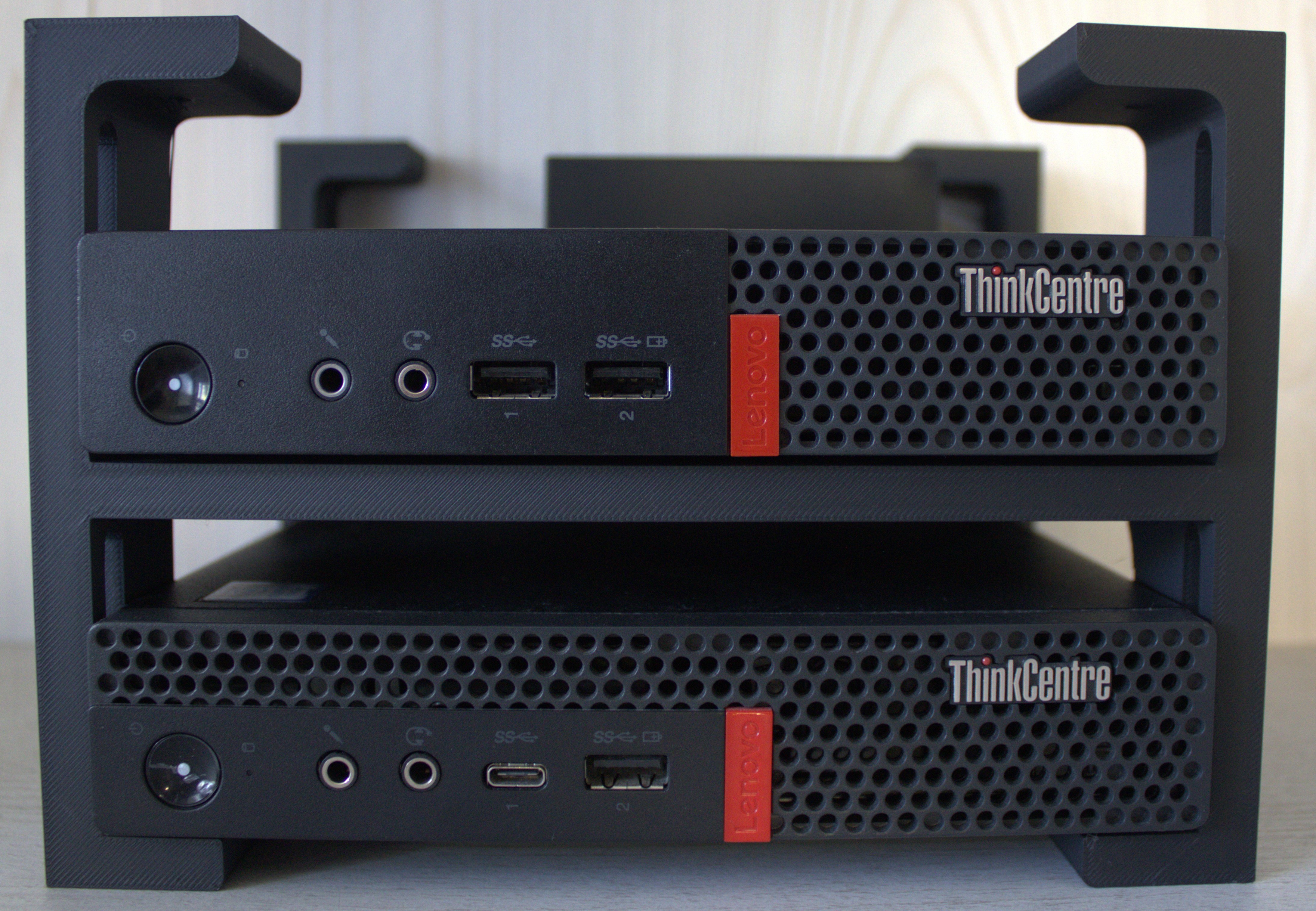
- TP-Link ER605 v2 router acting as the network gateway.
- TP-Link 5p LS1005G unmanaged switch.
- Main Server: Lenovo ThinkCentre M720q Tiny, equipped with an i5-8500T CPU, 32 GB RAM, 500 GB NVMe, and 1 TB SATA SSD. I chose it for its low power consumption (~12.5W idle) paired with relatively high performance, allowing for 24/7 operation without significant energy costs.
- Backup Server: Lenovo ThinkCentre M910q Tiny, equipped with an i3-7100T CPU, 16 GB RAM, 256 GB NVMe, and 500 GB SATA SSD.
- Custom 3D-printed rack.
Environment Architecture
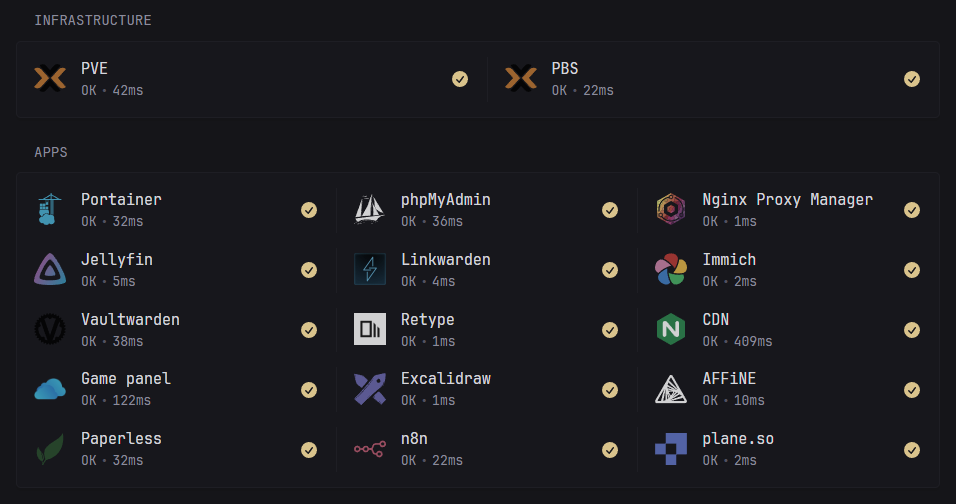 The virtualization platform is Proxmox Virtual Environment.
Services are hosted in Linux or Docker containers, or VMs.
LXC containers are used for their low resource overhead, while VMs are deployed where full isolation is required.
The virtualization platform is Proxmox Virtual Environment.
Services are hosted in Linux or Docker containers, or VMs.
LXC containers are used for their low resource overhead, while VMs are deployed where full isolation is required.
Network
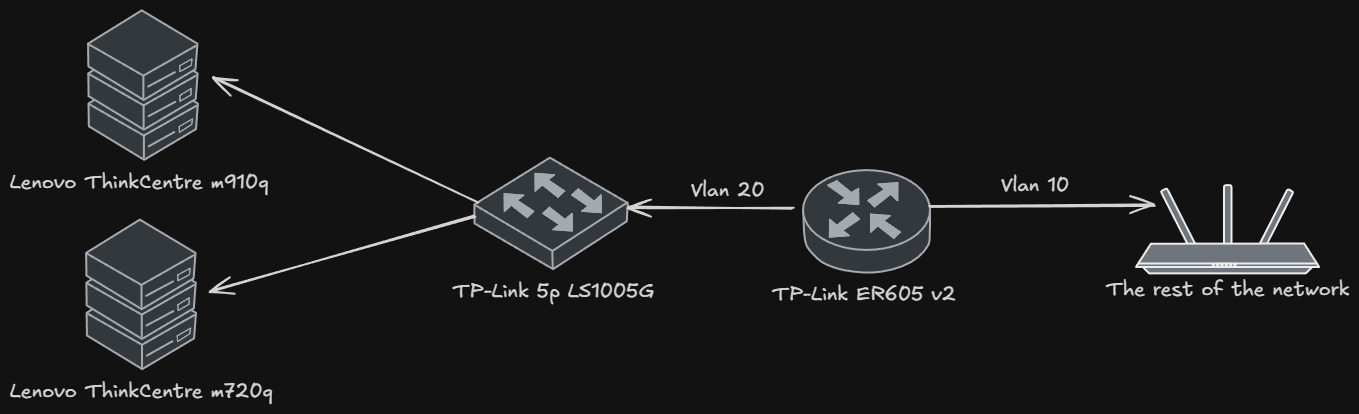 The network is logically divided into VLANs that separate user traffic from server traffic.
Inter-VLAN traffic is not filtered at the router level due to software limitations.
Access control is implemented at the host level (PVE firewall), where specific machines have restrictive communication rules.
The network is logically divided into VLANs that separate user traffic from server traffic.
Inter-VLAN traffic is not filtered at the router level due to software limitations.
Access control is implemented at the host level (PVE firewall), where specific machines have restrictive communication rules.
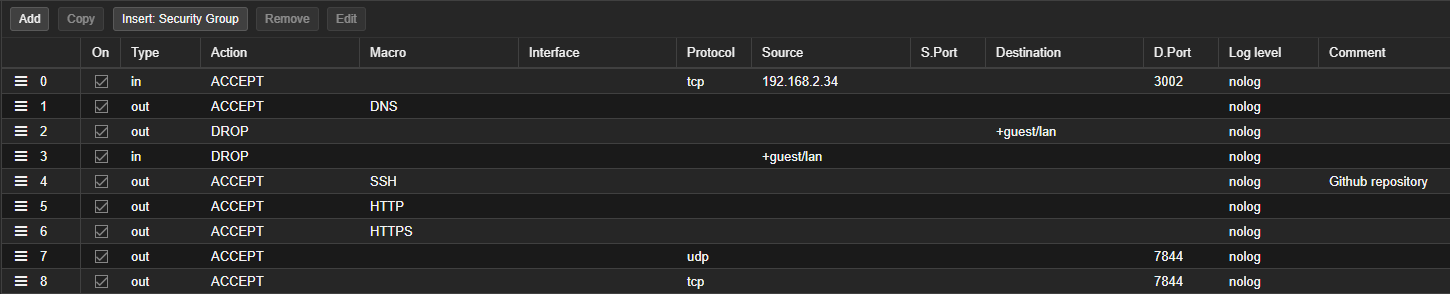
Example PVE firewall configuration for a public service:
 Additionally
 Input and Output Policy is set on Drop.
I experimented with deploying Omada Controller as a VM in Proxmox to unlock full traffic filtering features. However, I encountered an issue: the router adoption process forces a factory reset, which, given my homelab's IP addressing (192.168.2.0/24), causes a loss of connectivity with the controller.
GitOps for Docker services
 In search of an easy way to update all Docker services, I implemented a GitOps-like workflow in my homelab.
The stack update workflow is as follows:
- A new version of a Docker image is released.
- Renovate opens a pull request.
- I review and merge the pull request.
- Portainer polls the repo every 2 minutes:
- If changes are detected, it pulls the latest
docker-compose.ymlfrom the repository. - A redeployment of the entire stack is then performed.
- If changes are detected, it pulls the latest
Portainer operates in polling mode because it is more secure than using a webhook, as it doesn't require exposing a public endpoint.
In this configuration, the entire process of detecting new versions and later deployment is fully automated.
My only task during an update is to check and merge the pull request.
If a service fails to start on a new version for any reason, I can easily roll back to the previous image by reverting the pull request.
Initially, all docker-compose.yml files were in a monorepo, but this caused an issue where Portainer would redeploy all existing stacks every time the repository was updated. Therefore, each Docker-hosted service now has its own GitHub repository.
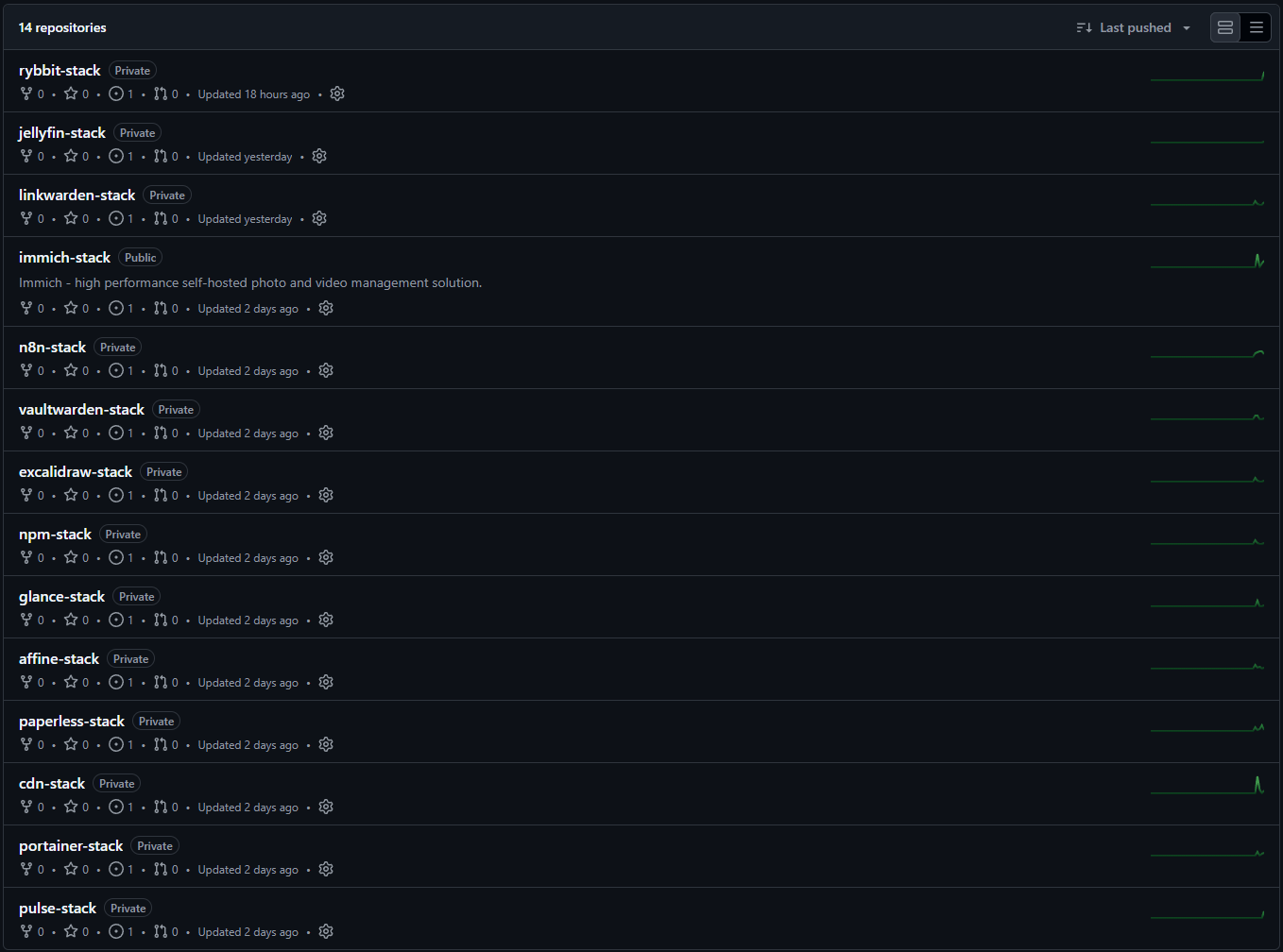
Selected repositories are open source and available on GitHub.
I only store .env.example files in the repositories. Secrets and environment variables are configured directly within Portainer during the initial stack deployment. This ensures that sensitive data does not leak into the GitHub commit history.
With automated updates, stacks are updated much more frequently, leading to more images being downloaded. This created a new problem of local storage being filled with unused images.
To solve this, I implemented a cron job (docker image prune -af) that removes unused images daily.
Service Access
Only selected services are accessible from the internet; in the case of websites, they are exposed via Cloudflare Tunnel.
When a tunnel isn't a viable option and a port must be opened, I do not expose my router's public IP address. Instead, I use an external reverse-proxy provider to minimize the impact of DoS/DDoS (Denial of Service/Distributed Denial of Service) attacks.

Access to private services that I do not want to expose directly to the internet is handled via the Tailscale VPN.
This allows me to access them from anywhere in the world without compromising their security.
For even greater security, I have restricted VPN access only to the VLAN segment dedicated to the homelab.


SSL Certificates
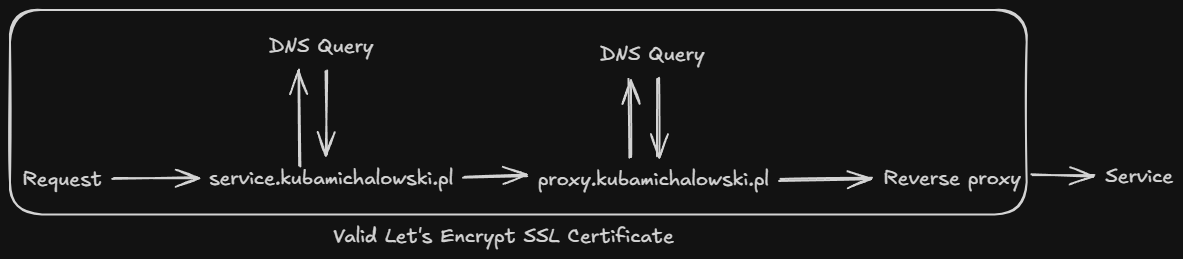
Every service in my homelab is assigned its own subdomain with a Let's Encrypt SSL certificate.
SSL certificates are generated using a DNS challenge. This allows services to remain inaccessible from the internet while still having a trusted SSL certificate.
Certificates are managed by a reverse proxy or directly by the specific service.
Observability
External monitoring
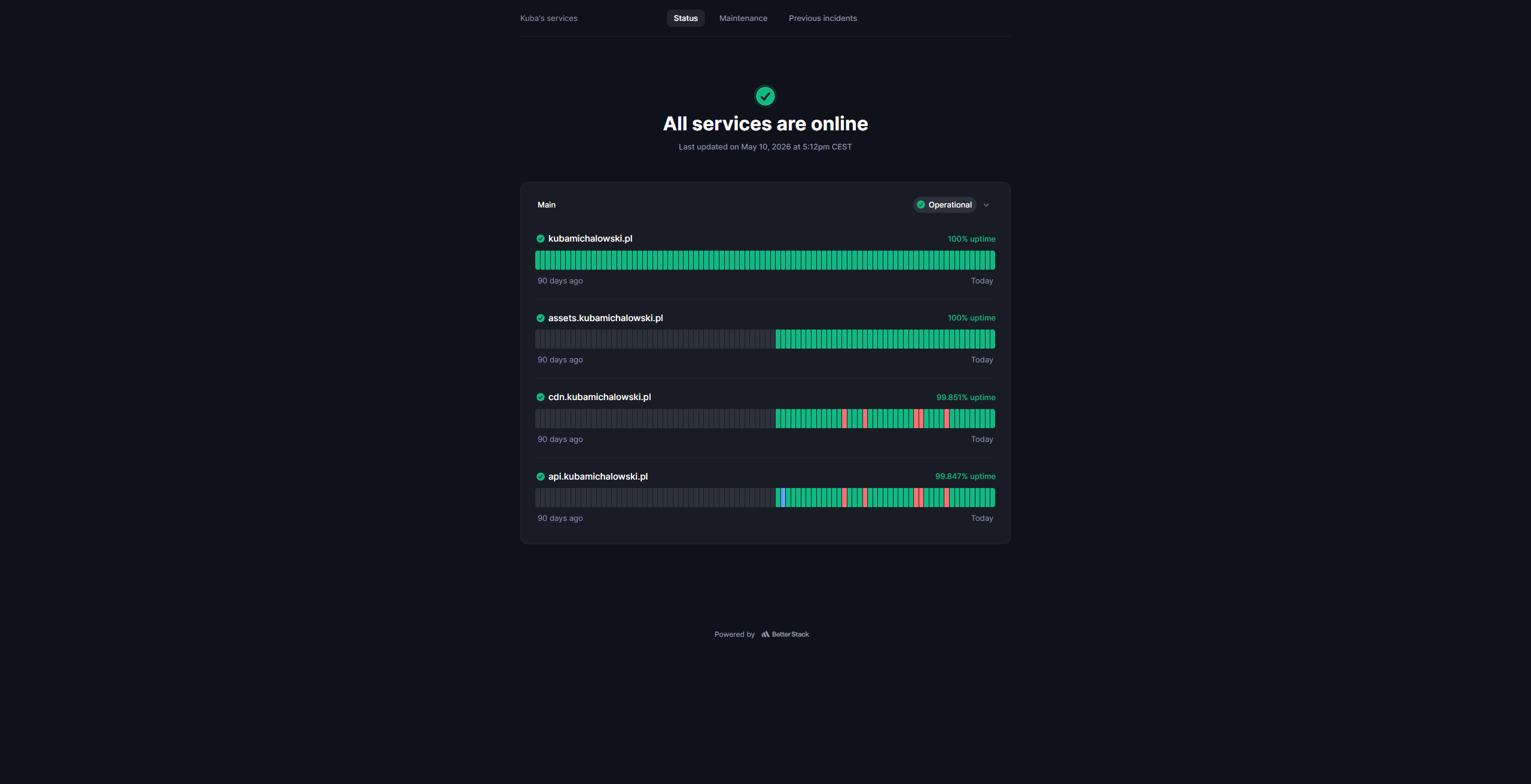
BetterStack monitors the availability of my public services and sends notifications about incidents.
Local monitoring
Initially, I implemented Pulse to monitor hosts, containers, and services within my network due to its simplicity.
However, this solution proved to have several drawbacks (e.g. 95% of alerts were false positives), and I am currently in the process of migrating to a Loki + Prometheus + Grafana stack.
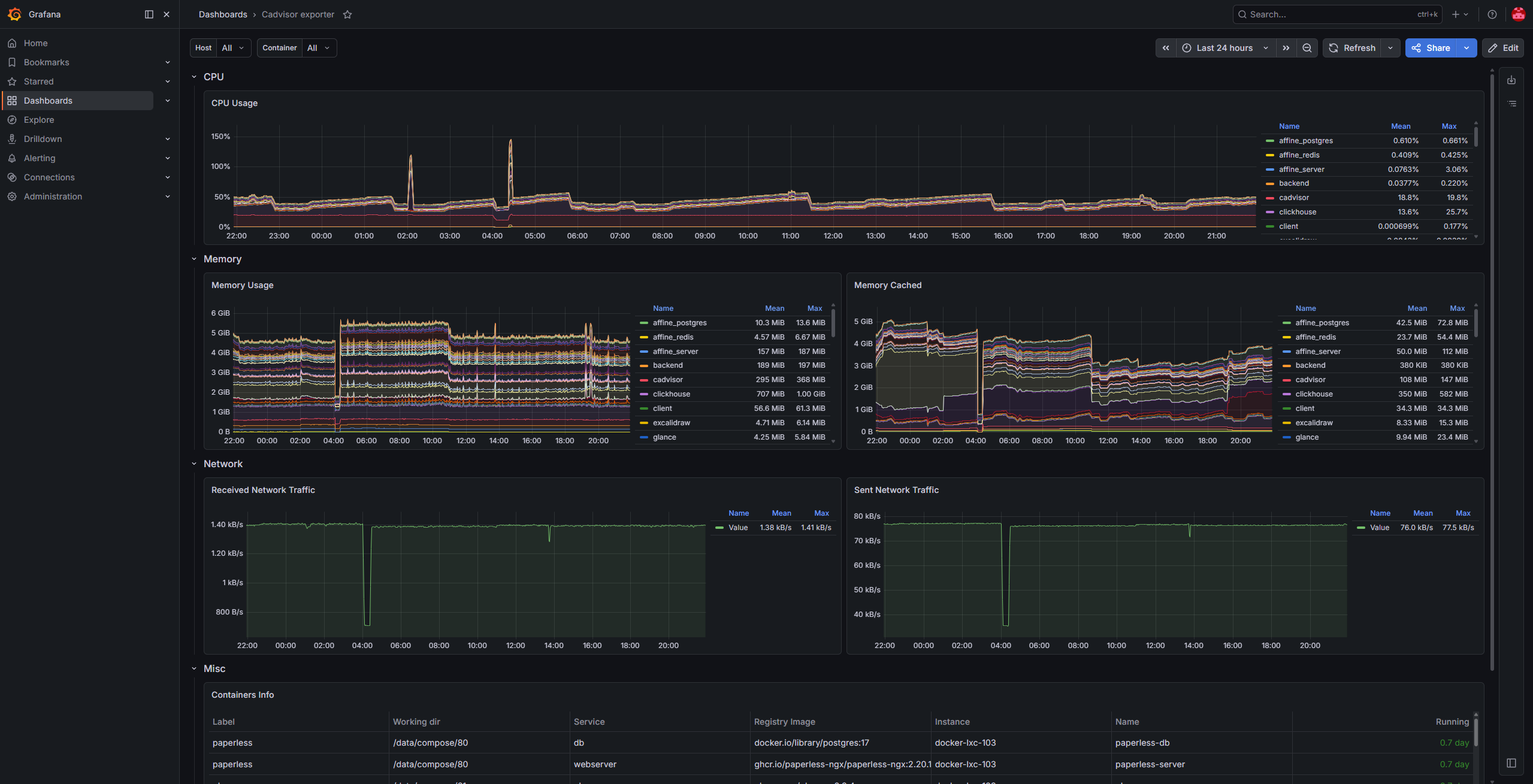
I have already implemented:
node-exporter: deployed on PVE and PBS hosts.cAdvisor: deployed on every Docker host.pve-exporter: collecting metrics from the PVE API.pbs-exporter: collecting metrics from the PBS API.
Email Infrastructure
To ensure reliable delivery of system notifications and professional handling of multiple email addresses in my domain, I implemented a hybrid routing model.
This solution combines two services:
-
Cloudflare Email Routing: Handles inbound traffic. It allows for the creation of an unlimited number of aliases, which are automatically forwarded to my private inbox.

-
Mailgun: Acts as a full SMTP server for sending notifications from services running within the homelab.

Why this configuration?
Combining these services solves two key challenges of maintaining a reliable email infrastructure:
- Zero operational costs: I utilize the free tiers of both services (including up to 3,000 monthly messages in Mailgun), allowing for professional email handling at no cost.
- Simplicity and Reliability: I don't have to configure or maintain a full mail stack, so I don't need to worry about deliverability, and system notifications don't end up in spam.
Backups
The backup system in my homelab is powered by Proxmox Backup Server.
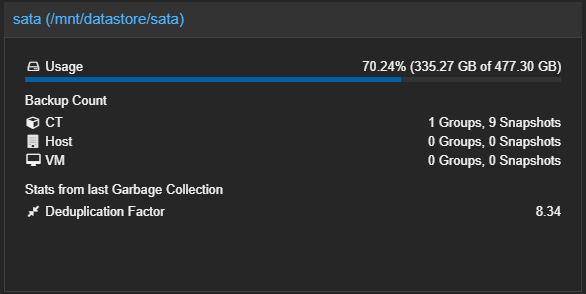
I implemented this solution to solve the issue of backing up a large LXC container running Docker (~330 GB).
Thanks to deduplication and incremental backups, 8 days of backups take up only 335 GB instead of the expected ~2.5 TB.
The current incremental setup allows me to store 7 daily and 2 weekly backups for this container.
Previously, after the backup jobs completed, a hook script checked whether there were still active tasks on the PBS server and shut it down if none were left.
The issue arose after adding a second datastore. Since a single PVE backup job cannot target two different datastore's simultaneously, I configured two separate jobs.
This configuration introduced a problem: PVE backup jobs run sequentially even when scheduled for the same start time, and their execution order is unpredictable, which broke the hook script's logic.
As an alternative solution, I set up a cron job scheduled for 5:00 AM, allowing a safe time buffer based on the average 25-minute duration of the backup processes.
0 5 * * * root /usr/local/bin/shutdown.sh > /dev/null 2>&1I also use manual snapshots before making major changes.
Troubleshooting
The Daylight Saving Time Trap
In the example below, during the transition from CET to CEST, the Wake-on-LAN and backup tasks (originally scheduled for 02:22 and 03:00) were triggered simultaneously at 03:00. This resulted in a race condition where the PBS server hadn't finished booting before the backup job attempted to connect.
INFO: skipping disabled matcher 'default-matcher'
INFO: notified via target `notification`
TASK ERROR: could not activate storage 'pbs': pbs: error fetching datastores - 500 Can't connect to pbs.kubamichalowski.pl:8007 (No route to host)
To resolve this and ensure reliability year-round, I shifted the schedule forward by one hour:
WOL:02:22➞03:22Backup:03:00➞04:00
This ensures that regardless of the current time zone offset, all tasks are executed in the correct sequence.
Network Interface Hang
I encountered an issue where services would intermittently stop responding and the server would drop off the network, despite remaining physically powered on. Kernel log analysis revealed a specific driver issue:
Dec 11 21:21:54 pve kernel: e1000e 0000:00:1f.6 eno1: Detected Hardware Unit Hang:
  TDH                  <51>
  TDT                  <64>
  next_to_use          <64>
  next_to_clean        <50>
buffer_info[next_to_clean]:
  time_stamp           <1052d01c3>
  next_to_watch        <51>
  jiffies              <1052da640>
  next_to_watch.status <0>
MAC Status             <40080083>
PHY Status             <796d>
PHY 1000BASE-T Status  <8ff>
PHY Extended Status    <3000>
PCI Status             <10>
Instead of manually adjusting ethtool parameters, I utilized a script from community-scripts.org. This script automatically created a systemd service that disables problematic offloading features upon every boot.
...output omitted...
  ℹ️   Searching for Intel e1000e and e1000 interfaces...
  ✔️   Found 1 Intel e1000e/e1000 interfaces
  ✔️   Selected interface: eno1 (e1000e)
  ℹ️   Creating systemd service for interface: eno1 (e1000e)...
  ✔️   Service for eno1 (e1000e) created and enabled!
  ℹ️     Service: disable-nic-offload-eno1.service...
  ℹ️     Status: Active...
  ℹ️     Start on boot: Enabled...
  ✔️   Intel e1000e/e1000 optimization complete for 1 interface(s)!

  ℹ️   Verification commands:...
  ethtool -k eno1 # Check offloading status
  systemctl status disable-nic-offload-eno1.service # Check service status
Post-optimization, I verified the offloading status to ensure the fix was persistent:
root@pve:~# ethtool -k eno1
Features for eno1:
rx-checksumming: off
tx-checksumming: off
tcp-segmentation-offload: off
generic-segmentation-offload: off
generic-receive-offload: off
rx-vlan-offload: off
tx-vlan-offload: off
...output omitted...
What I've learned
- Automation saves time - thanks to GitOps, keeping about 50 containers up to date, now takes me seconds (PR merge) instead of dozens of minutes of manual work.
- Cost optimization - effective hardware selection for hosting various services while maintaining low power consumption.
- Effective backup - PBS has demonstrated that data deduplication and incremental backups are essential when disk space is limited.
Roadmap
The following list is a backlog of planned improvements, implemented based on priority and available time:
- Adding local
Gitserver as a mirror forGitHub. - Replacing the current router with an OPNsense-powered Mini PC.
- Adding an uninterruptible power supply.
Summary
This homelab is the result of two years of learning through practice. Despite some compromises, I have managed to create a stable, secure, and highly automated environment that is, most importantly, fully understood by me as the administrator. It supports my daily work on personal projects, and every problem solved brings this environment closer to a professional-grade infrastructure.